Application Description
Umo Mobility is a complete transit app created to make your travel simple. It offers multi-modal trip planning, live transit alerts, and contactless payments—all through an easy-to-use interface. Main features include buying transit passes, loading wallet funds, and unlocking promotional fares for smooth boarding. The app also gives you live updates, route planning, and a clear ride history to track your trips. Accessible and multilingual, Umo Mobility is your modern travel partner.
Key Features of Umo Mobility:
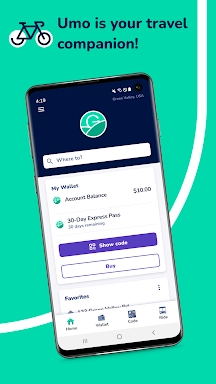
⭐ Simplified Home Screen – Umo Mobility's main screen is redesigned for easy use, offering fast access to all features from the new Home tab. Forget confusing layouts—enjoy a smooth user experience.
⭐ Easier Agency Location – Finding the right transit agency nearby is simple with Umo. The updated agency list shows options nearby, so you pick the correct one when buying fares. No more guessing or browsing endless choices.
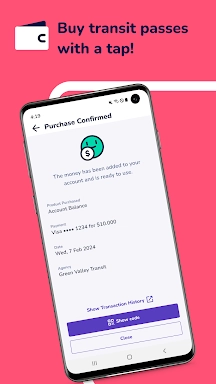
⭐ Improved Payment Flexibility – Buy transit passes, top up your wallet, and manage payment methods easily. Enjoy a single wallet, multiple ways to pay, and clear fare details across all supported agencies.
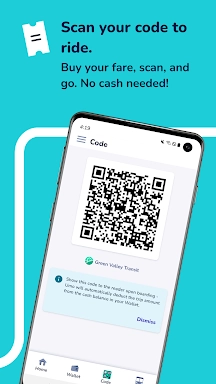
⭐ Contactless Boarding – Boarding is simpler with Umo's dynamic QR codes. Quickly pull up your boarding code from the Code tab or use Show Code links across the app for easy fare payment.
User Tips:
⭐ Plan Ahead – Use Umo’s trip planner to map out your route beforehand. Enter your start point and destination for fast, clear navigation.
⭐ Monitor Your Rides – Track your trip history to stay organized. View detailed monthly reports or a brief summary from the main menu for easy oversight.
⭐ Stay Updated – Use Umo’s real-time info for accurate bus tracking and journey planning. Get timely alerts so you never miss a connection.
Conclusion:
Umo Mobility makes travel more convenient, efficient, and inclusive than ever. With streamlined navigation and flexible payment options, this all-in-one transit app simplifies life on the move. Download Umo today and move through your day with ease.
How to Use This App:
Download the App: Install Umo Mobility from your device's app store.
Create an Account: Register using your phone number, email, or social account.
Select Your Agency: Choose your transit provider from the available list.
Plan Your Trip: Enter your destination, and the app will recommend top routes and transport types.
Purchase Passes or Add Funds: Use the in-app wallet to buy passes or add money for pay-per-ride travel.
Board Contactlessly: Show the dynamic QR code from the Code tab when boarding to pay your fare.
Check Real-Time Information: Watch live updates for bus arrivals and trip planning.
Access Ride History: Review previous trips and payments from the main menu.
Set Language Preferences: Change app settings to your language, such as English, Spanish, or French.
Get Help: Use in-app support or visit the Umo Mobility website if you need assistance.
Umo Mobility Screenshots
Reviews
Post Comments
Trending Games
Trending apps




![Neko Paradise – New Version 0.18 [Alorth]](https://img.1q2p.com/uploads/03/1719595169667ef0a1c529a.jpg)







Topics
More
Top-Rated Productivity Tools to Boost Your Workflow
Mind-Bending Puzzle Games for Android
Best Productivity Apps to Boost Your Efficiency
Offline Puzzle Games to Play Anytime
Explore the World of Arcade Games
Best Casino Games Online
Beauty Apps: Your Guide to Stunning Looks
Top Rated Strategy Games on Google Play
Latest Articles
More