Application Description
Elevate your typing with My Photo Keyboard, an app that lets you customize your keyboard background using your own photos. Works seamlessly across all apps on your device, allowing you to pick images from your gallery or take new ones with your camera—making every keypress a visual treat. Express your personal style every time you type!
Explore the Features of My Photo Keyboard:
❤ Customize with Personal Photos: Transform your keyboard background with your own favorite photos. Make typing truly personal by displaying cherished memories right at your fingertips—no more generic layouts!
❤ Works with All Apps: My Photo Keyboard integrates smoothly with every app on your device. Whether you're messaging friends, posting on social media, or writing emails, your custom keyboard is always ready.
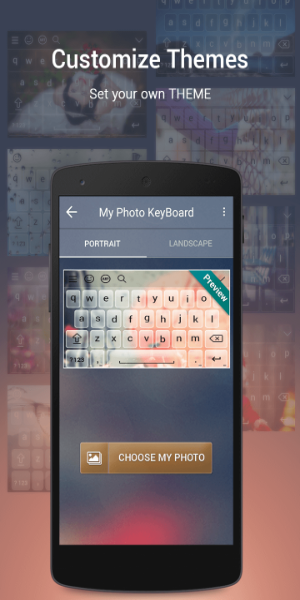
❤ Simple Photo Selection: Easily change your keyboard’s background by selecting any image from your gallery or snapping a new photo with your camera. A live preview lets you see exactly how it’ll appear as you type.
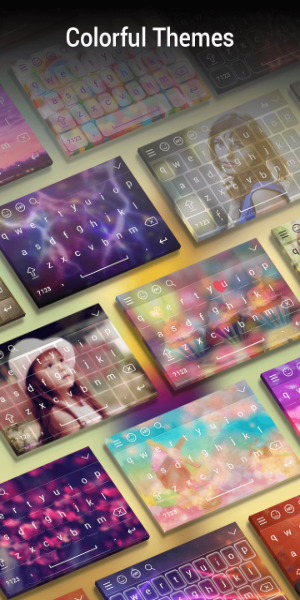
❤ Vibrant Color Themes: Discover a rich collection of colorful themes to match your mood or style. From bold and lively to sleek and minimal, there’s a unique theme for every taste.
Helpful Tips for Users:
❤ Getting Started: Launch the My Photo Keyboard app and tap the "My Photo Keyboard" option to begin customizing your typing experience.
❤ Set as Default Keyboard: In the app, choose My Photo Keyboard as your default input method so your personalized design appears whenever you type.
❤ Choose Your Background: Pick a photo from your gallery or use your camera to capture a fresh image. Preview it before applying to ensure it looks just right.
❤ Browse Colorful Themes: Explore the variety of available themes and pick one that reflects your style. Try mixing and matching to create a keyboard that's uniquely yours.
❤ Language & Font Customization: Personalize further with support for over 50 languages and multiple font styles. Choose the language you type in most and a font that shows off your personality.
Design and User Experience
Intuitive Interface
The app features a clean, user-friendly layout with easy-to-navigate menus and clear icons, helping you access customization tools quickly and without confusion.
Customization Options
Easily upload photos from your gallery or take new ones using your camera. The app supports various image formats, giving you full creative control over your keyboard’s look.
Smooth Functionality
Experience consistent, responsive performance across all your apps. My Photo Keyboard ensures a seamless typing experience without lag or interruptions.
Preview Feature
Review how your selected photo fits as a keyboard background before saving. This lets you make adjustments and ensures you're happy with your final choice.
Versatile Color Schemes
Along with photo backgrounds, customize your keyboard's text color. Match or contrast your keystrokes with the background for a visually coherent design.
Accessibility
Designed for everyone, the app includes adjustable font size and style options, making it easy to use for people with different visual preferences and needs.
My Photo Keyboard Screenshots
Reviews
Post Comments
Trending Games
Trending apps




![Neko Paradise – New Version 0.18 [Alorth]](https://img.1q2p.com/uploads/03/1719595169667ef0a1c529a.jpg)







Latest Articles
More